Resource Guide
Clear Industrial Labels on Dark Equipment: Keep the Data Visible
Clear film can make an equipment label look integrated, but dark housing color can swallow black text and barcode spaces. Design contrast before approving the finish.
Published 2026-09-27
Digital proof before production. Material and adhesive options are discussed according to your application requirements.
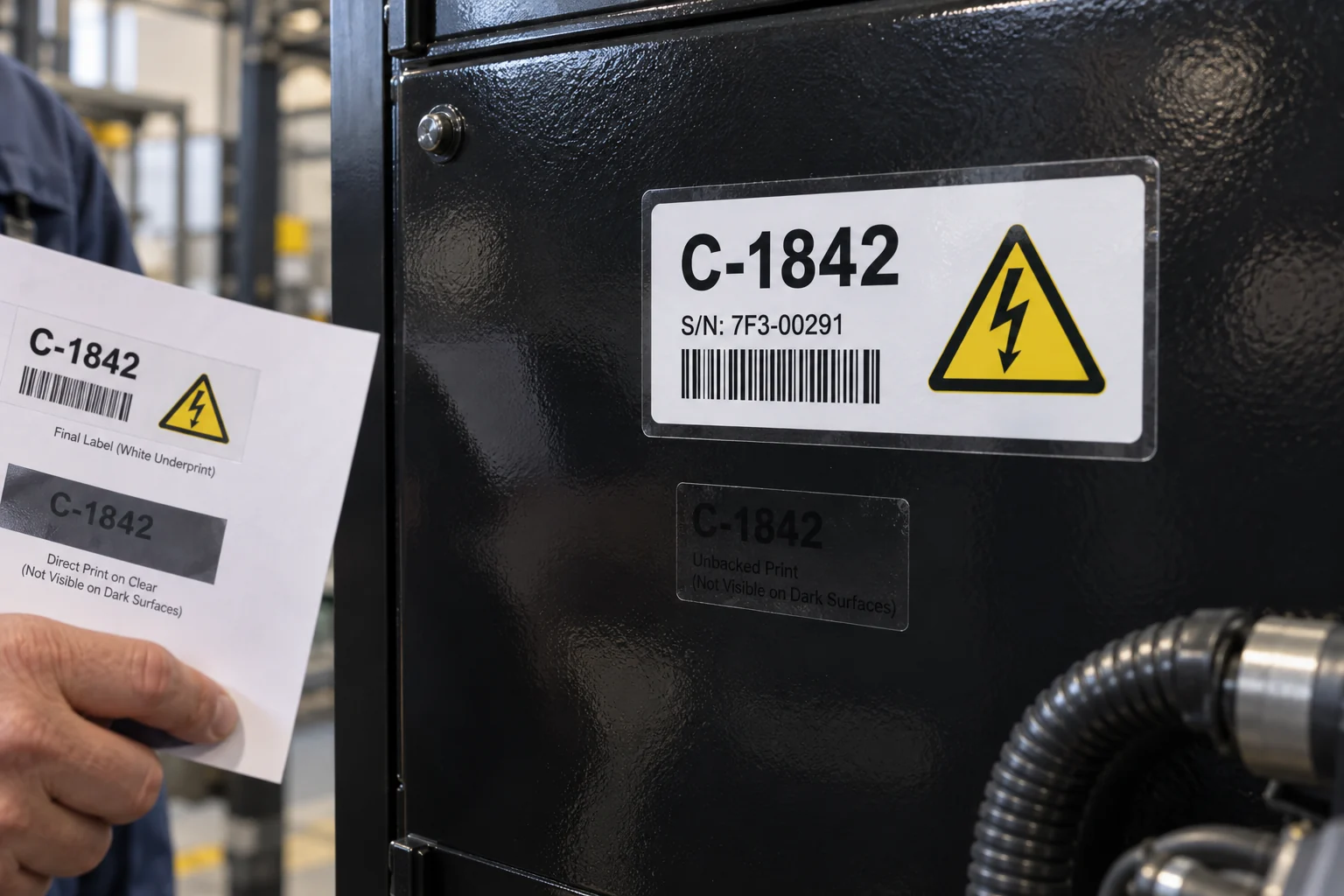
Quick Answer: Give Critical Data an Opaque Background
On a dark housing, black print directly on clear film can disappear. Keep the clear perimeter or selected areas for the intended visual effect, while using a suitably opaque light backing behind the ID, warning and code fields. Test the final printed label on the actual equipment color. A proof viewed against white paper is misleading if the label will live on black powder coat or dark plastic.
A Composite Design-Review Moment
Imagine a designer holding a transparent label sheet up to the light. The black barcode and small serial line look sharp. On the matte black enclosure, the same elements blend into the surface. This is an illustrative design scenario. The choice is not necessarily clear versus white for the entire label. A targeted white underprint may preserve the clean edge while protecting readable information. If the buyer wants maximum scan reliability with minimal printing complexity, a conventional opaque white label may still be the better choice.
Separate the Appearance Zone From the Data Zone
GS1 guidance for barcode colors favors dark marks on a light background. Its 2D color guide notes the value of an opaque white area beneath a black 2D code on transparent or translucent material. That guidance is about symbol contrast; it does not certify this website printing process. Apply the same practical question to small text and functional warning icons: can a worker read them from the normal position against the final substrate?
- PRINT: define which zones are transparent, white-backed and colored; show the backing on the artwork proof.
- CODE: include the actual symbol size, quiet area and intended scanner or phone workflow.
- SURFACE: supply the real panel color, gloss, texture and any variation between production batches.
- USE: check viewing angle, lighting, moisture or cleaning that may change appearance.
The Attractive Option That Can Lose
A full clear label may make a product photo look restrained and premium, yet create a daily identification problem if it hides the serial number. A white rectangle only behind the code might solve scanning but leave the warning text weak. Try the finished-size sample on a dark panel and check it from an operator distance. Where no clear area adds useful value, a white or light-colored film can be easier to produce consistently. Design should make the right information effortless to find, not merely look clean in a mockup.
Approve the Actual Layer Order
Confirm whether the printer will use white ink, an opaque backing film or another construction. The approved proof should show layer order, cut shape, barcode placement, transparent margin and print orientation. Inspect a physical sample on the specified substrate, including edges and any lamination. Decode the exact barcode payload used for the job; a code-shaped graphic in an AI image cannot do this. Ask for a repeatable reorder specification so a later batch does not omit the white backing.
Cover image is an AI-generated contrast illustration. Its equipment ID and barcode are sample artwork and are not validated production data.
Contrast References and Product Options
These external references concern barcode design. They do not guarantee a supplier construction or finished-label grade.
GS1: 2D Color Guide
Examples of white backing on transparent substrates for code contrast.
View detailsFAQ
Questions Buyers Ask
Can a barcode be printed on a fully transparent label?
It can be printed, but scan reliability depends on contrast against the final surface. Test the actual code on the actual equipment; an opaque light area is often worth comparing.
Does white underprint make the whole label look white?
Not necessarily. Artwork can specify white only behind the information that needs contrast, subject to the chosen printing capability and proof.
Is a screen mockup enough for approval?
No. Inspect a physical finished-size label on a representative dark panel under realistic lighting and scanning conditions.