Tire Warehouse Date Labels: Receipt, Print or Manufacture?
Published
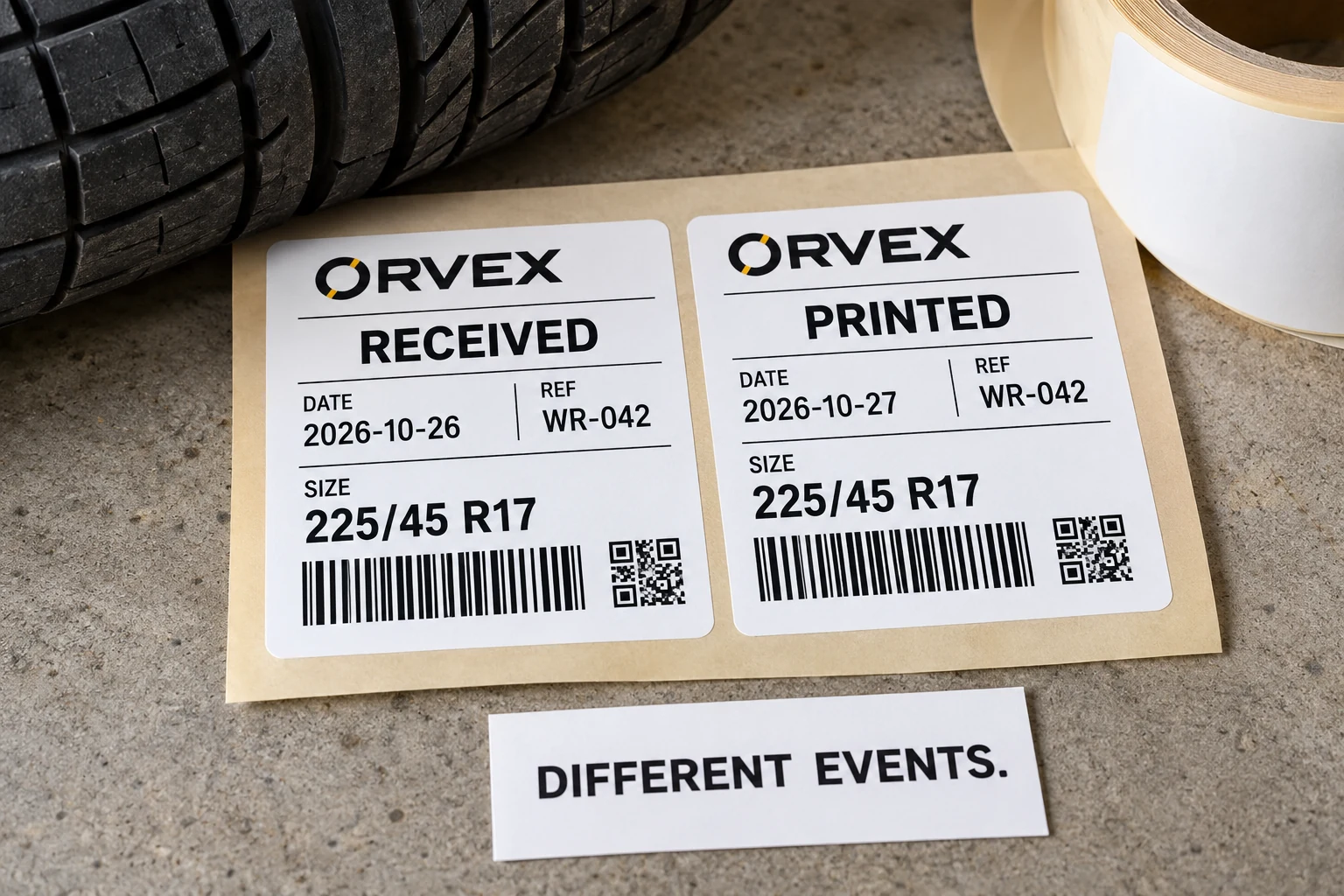
A tire arrives on Monday. Its warehouse label is reprinted on Tuesday. The template contains one field called DATE, and the print operator has set it to today's date. The sticker looks current. The receiving record now appears to describe a different event.
Before ordering date-bearing tire labels, name the event the date represents, identify its approved source and decide what a reprint should preserve. Formatting comes after those decisions. A warehouse receiving date, a label printing date and tire manufacturing information are separate facts, even when someone wants them in the same small rectangle.

Ask what happened on that date
Imagine a distributor preparing labels for newly received tires. Purchasing asks for a date field because staff need to sort stock. The designer assumes it means the day the sticker was made. Both interpretations sound reasonable until a damaged label is replaced. This is an illustrative workflow, not a reported customer incident.
Start by asking which decision the date supports. Does receiving need to find the delivery transaction? Does the warehouse want the date an item entered a particular location? Does the print owner merely need to identify when a label copy was generated? Each answer points to a different source and a different heading.
Write RECEIVED, PRINTED or another owner-approved description instead of leaving an unexplained DATE. Avoid headings such as FRESH or NEW that invite a conclusion the recorded event cannot establish. Receiving a tire this morning does not establish when it was manufactured, its condition or its suitability for use.
Write a field contract before a format rule
Give the supplier a short field dictionary with a sample record. The dictionary should tell a reviewer what the date means without requiring access to the person who designed the template.
| Field decision | What the owner should approve | Example or exception to resolve |
|---|---|---|
| Event | The named transaction being recorded | First receipt versus a later transfer |
| Source | Controlled system field or authorized entry | Missing receipt date stays unresolved |
| Display | Exact heading and visible format | RECEIVED 2026-10-26 |
| Time basis | Relevant site or system date rule | Transaction near midnight |
| Reprint | Preserve the event or record a new print event | Tuesday reprint of Monday receipt |
| Encoded data | Whether the date is encoded and under which rule | Visible text is not automatically barcode data |
These are proposed buyer controls, not a required industry form. The data owner should choose which events belong on the physical label and which belong only in the inventory record. Do not create a date simply because an empty template field looks unfinished.
ISO's public date-format explanation describes year-month-day representation as a way to reduce ambiguity between date conventions. That can be useful for an agreed warehouse display, such as 2026-10-26. It does not make that format a universal requirement for tire stickers or override a receiving system's specified data syntax.
Keep the display rule and the stored value distinct. A readable month name may suit one internal process, while an interface expects a defined numeric string. Have the system owner approve the actual transformation; do not let a spreadsheet's automatic formatting become the specification.
Test an actual import and a reprint
Prepare a small witness file that exposes uncertainty rather than demonstrating only an easy date. Include a day and month that could be confused, a month boundary, a year boundary and a record whose source date is unavailable. Use clearly labeled demonstration records during setup; do not introduce invented dates into live stock.
Ask the print owner to show the resulting field after the real import or template operation. Compare it with the approved source, then inspect a finished-size label. A screenshot of the original spreadsheet does not establish what the label software received.
Next, repeat one record through the reprint route. If the label says RECEIVED, its event should follow the approved receipt record rather than silently changing to the reprint day. If print traceability is also required, record that separately under its own rule. A new label copy is not evidence of a new delivery.
Where timestamps are converted into dates, the system owner should specify the applicable time basis. A transaction around midnight can fall on different calendar dates under different settings. Purchasing does not need to design the software, but it does need one released rule the supplier and warehouse can both check.
Keep manufacturing information in its own lane
A custom warehouse date should not be presented as tire manufacturing information. If the project also captures an original tire marking, retain its separate source and approval path. The TIN and inventory-label guide addresses that source-to-record relationship. This article concerns supplemental warehouse events, not decoding tire age or deciding tire safety.
Do not fill an unknown manufacture field with the receipt date. Do not copy a value from another tire because its size and brand match. If a required field lacks an authoritative source, the responsible owner must resolve the exception before it is represented as confirmed information.
The same discipline applies to expiry wording. A warehouse date does not establish a service-life limit. Any such claim needs its own authority and approval; a printer should not calculate one from a convenient template default.
When the database is enough
An extra printed date is useful when someone genuinely needs it at the physical handling point. If staff always scan a stable reference and the system already shows the approved receipt event, adding another date can create a second value to reconcile. Keeping the event in the database may be the simpler choice.
Where a date does belong on the sticker, release its field dictionary with the artwork and witness records. Include the reprint behavior, missing-value rule and named approver. For custom tire labels, prepare a date-field brief with sample data, event definitions, current and proposed labels, dimensions, tire surface photos, quantity and roll direction. Organize the requirements on the contact page, then send supporting files through its email or WhatsApp route. The useful approval is that everyone means the same event when they read the date.